Water Eject Sound: How to Get Water Out of Phone Speaker Fast and Safely
A water eject sound is a low-frequency tone — typically 150–220 Hz — played at high volume to vibrate trapped water out of a phone speaker. Run it in 30-second cycles with the speaker facing down; minor water muffling often clears within two to three rounds, at zero cost.
You hear it the moment you pick up your phone — that muffled, underwater sound instead of your normal ringtone. Maybe you dropped it near the sink. Maybe you got caught in the rain during your morning commute. Maybe it was a gym session and your phone slipped off the treadmill into a puddle of water. In India especially, the monsoon season catches people off guard every single year.
The good news: most muffled speaker problems caused by water are fixable at home, for free, in under 3 minutes — using a specific sound frequency that physically pushes water out of your speaker grille.
This guide covers exactly what a water eject sound is, how it works, how to use it step by step on every common phone brand, what to do when it doesn’t work the first time, and the clear warning signs that mean you need professional help.
Before You Start: If your phone will not turn on, the screen is flickering, or water entered through the charging port — stop. Do not use any sound tool yet. Go straight to the “When to Visit a Repair Shop” section below.
What Is a Water Eject Sound?
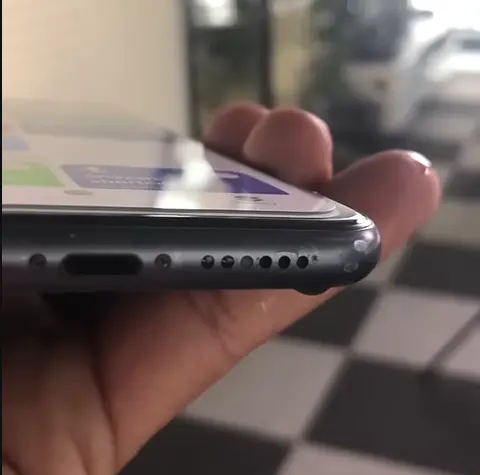
A water eject sound is a specific audio tone — typically in the range of 150–220 Hz — that is played through a phone speaker at maximum volume to physically push trapped water droplets out through the speaker grille opening. It works because sound waves are vibrations: at the right frequency and volume, those vibrations overcome the surface tension holding water droplets to the speaker membrane and grille walls, shaking them loose and pushing them outward through the opening. Because this is ordinary audio playback, there is nothing to install and nothing to open up — you simply play the tone with the speaker facing down and let gravity help. It is most effective on fresh water trapped recently in the grille, and it cannot reverse corrosion or repair a speaker that is physically damaged.
This is not a new idea. Apple built a similar feature into the Apple Watch starting with Series 2, called Water Lock — turning the Digital Crown after swimming plays a tone that vibrates the speaker cavity to help clear water.
The free online Fix My Speaker tool uses this same principle — for any phone, in your browser, with no download required. iPhone users may also know the popular “Water Eject” Siri Shortcut, which plays a similar low-frequency tone; this browser tool applies the same idea without needing to install anything.
How Does Water Get Into Phone Speakers? (Common Causes in India)
Before you run the sound, it helps to know the exact cause. Water enters phone speakers in more ways than most people realise:
Rain and Monsoon Exposure
This is the number one cause in India. During the southwest monsoon — the June to September rainy season tracked by the India Meteorological Department (IMD), horizontal rain driven by strong winds forces moisture into speaker grilles that normal downward rain would never reach. A quick 10-minute walk in heavy rain in Mumbai, Delhi, Kolkata, Chennai, or Bengaluru is enough to muffle a speaker — even if your phone never touched a water surface directly.
Sweaty Hands and Gym Sessions
Salt water from sweat is actually more damaging than plain water over time. Salt leaves mineral deposits inside the speaker grille as it dries. Gym workouts, outdoor cricket, or cycling in hot weather all expose your speaker to salt moisture repeatedly.
Bathroom Steam and Condensation
Taking your phone into a hot shower room — even without direct water contact — deposits moisture inside the grille through steam. Moving quickly from a cold air-conditioned office to humid outdoor air causes the same condensation effect.
Sink Splashes and Kitchen Exposure
Quick phone checks near the kitchen sink or bathroom tap expose the grille to water spray. Soapy water is thinner than plain water and gets into smaller gaps than you would expect.
Dropped in Water
Toilet drops, pool accidents, and rain puddles are obvious — but even these usually cause only speaker grille blockage, not deep internal damage, as long as the submersion was brief.
Emergency First Steps — Do These Before Running the Sound
The order of these steps matters. Doing things wrong in the first 60 seconds can push water deeper into the phone.
- Turn your phone screen off immediately and keep it off. The less power running through wet circuitry, the better.
- Remove the phone case if you have one. Cases can trap moisture against the speaker grille and slow down ejection.
- Wipe the outside of the phone gently with a dry cloth. Remove visible water from the surface before proceeding.
- Do NOT shake the phone side to side. Shaking pushes water into other openings.
- Do NOT blow into the speaker grille with your mouth. Breath adds moisture, not removes it.
- Do NOT use a hair dryer or put the phone in direct sunlight. Heat damages the speaker membrane.
- Do NOT put it in rice. Rice absorbs ambient moisture from the air — it has no mechanism to pull water out of a speaker grille. It will waste your time.
The Rice Method Explained: Rice placed around a phone absorbs water vapour from the surrounding air. The water trapped inside your speaker grille is a completely separate problem — physically isolated inside the grille cavity. Rice cannot reach it. Skip the rice and use the sound tool instead.
Before you start: raise the volume, but not to a level that feels uncomfortable. Keep the phone away from your ear, and do not use this tool with headphones or earbuds connected. Stop immediately if the sound is unpleasant.
How to Use the Water Eject Sound — Step-by-Step Guide
This works on every phone that can open a browser. No download, no login, no app store. Open the Fix My Speaker page in your phone’s browser — Chrome, Safari, or Samsung Internet all work — and follow these steps:
- Turn your volume up, but not to the point of discomfort. A higher volume creates stronger vibration, which is what may help push water out. Keep the phone away from your ear while it plays, and stop right away if the sound feels unpleasant.
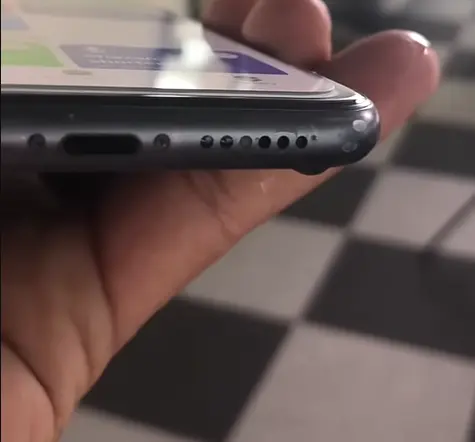
- Place phone with speaker facing down. Set your phone flat on a dry table, speaker grille facing downward. Gravity will help pull water toward the opening as the vibration shakes it loose. Do not hold the phone in your hand.
- Press the Water Eject button and let it run to 100%. Let the full cycle complete without interruption. The tone runs for approximately 30 to 60 seconds. Do not skip ahead or restart — let it finish.
- Switch to Deep Vibration Mode and run 2 to 3 more cycles. Deep Vibration Mode plays a stronger, lower-frequency pulse than the water eject tone. This second pass can help dislodge whatever the first round loosened. Running both modes may help more than either alone.
- Gently shake over a dry tissue after the final round. With the speaker facing down, give the phone a few gentle shakes. You will sometimes see a small water droplet appear on the tissue. That is your confirmation the tool worked.
Pro Tip: After your first full session, wait 30 minutes before running a second session. Water sometimes needs time to shift toward the grille. A second session after waiting often works better than repeating immediately.
Device-Specific Water Eject Guide
The same tool works on all phones, but positioning tips vary by device type. Here is what works best for the most popular phones in India:
| Device / Brand | Speaker Location | Best Positioning Tip |
|---|---|---|
| iPhone (all models) | Bottom edge | Place flat on table, bottom edge down. iPhone 15 Pro Max has a dual bottom speaker — run 4 cycles. |
| Samsung Galaxy S / A / M Series | Bottom edge | Place flat, bottom edge down. Samsung A-series phones often need 3 to 4 cycles due to deeper grille design. |
| Xiaomi / Redmi (all models) | Bottom edge | Xiaomi grille placement makes water ejection very effective. 2 cycles usually sufficient. Run at max volume. |
| Realme (all models) | Bottom or side | For side-mounted speakers, tilt the phone at 45 degrees with the speaker facing down during the second round. |
| OnePlus (stereo models) | Bottom + top | Stereo speakers need 3 to 4 full rounds. Alternate between bottom-down and top-down positions. |
| OPPO / Vivo | Bottom edge | Standard results on both brands. 2 to 3 cycles with speaker facing down. |
| iPad / Android Tablets | Bottom or side | Larger speakers may need 4 to 5 rounds. Hold vertically with speaker at the bottom for best gravity assist. |
Note on cycle counts: the numbers above are rules of thumb from hands-on testing during development, not measured results. Treat them as a starting point — how many cycles you need depends on how much water is trapped and where it sits, not only on the phone model. The positioning advice is the more reliable part of this table.
Why Is My Waterproof Phone Still Muffled? (IP67 and IP68 Explained)
An IP67 or IP68 rating does not make a phone speaker waterproof. IP ratings protect the internal components, while the speaker grille is intentionally left open — it has to be, because sound cannot travel through solid material. That is why a “waterproof” phone can still sound muffled after rain or a splash: water can and does enter the grille of every IP-rated phone in the world, especially under high-pressure contact such as strong monsoon rain or being dropped into water from a height. A muffled speaker on a water-resistant phone is therefore usually a grille-level blockage that a water eject sound may help clear, rather than a sign that the phone’s internal sealing has failed. The rating only tells you the phone body survived a controlled laboratory submersion test, as explained below.
IP67 means the phone survived a controlled lab test: submersion at 1 metre depth for 30 minutes in still, fresh water. IP68 is a more demanding version of the same test. Both ratings are defined under IEC 60529, the international standard that specifies these ingress protection tests. Real-world conditions — monsoon rain, pool splashes, bathroom steam — are different from lab conditions.
The water eject sound tool works just as well on IP68 phones as on unrated phones. The grille is open. The sound can reach it.
Water Eject Sound vs Other Methods — Honest Comparison
| Method | Does It Work? | Risk Level | Time Needed | Cost |
|---|---|---|---|---|
| Water Eject Sound Tool (Fix My Speaker) | Yes — often helps with recent water or light dust | Low risk in normal use | 2-3 minutes | Free |
| Rice Method | No — absorbs air moisture, not grille water | Low but slow | 24-48 hours | Very low |
| Hair Dryer / Fan | Partial at best | High — heat warps membrane | 10-20 min | Free |
| Cotton Swab | Surface only — cannot reach inside grille | Medium (lint risk) | 5 min | Free |
| Silica Gel Packets | Good supplement — not a replacement | Safe | 8-12 hours | Very low |
| Professional Repair | Yes — for all issues including damage | Safe | 1-3 days | Varies by city and shop; get a quote |
What If the Water Eject Sound Does Not Work?
If the water eject sound has not cleared your speaker after the first two or three rounds, do not assume the speaker is damaged — work through five checks first. Try different phone orientations so gravity helps the trapped water drain toward the grille opening. Wait 30 minutes, then run three more rounds, because water sometimes needs time to loosen before it moves. Consider whether the water was salty or sweaty rather than fresh, since residue behaves differently from clean rainwater and may need a different approach. Rule out software problems, which can imitate a blocked speaker. Finally, repeat the whole routine the next day — trapped water can shift overnight and clear on a second attempt. Only after all five steps fail should you treat it as a possible hardware problem and consider a repair visit.
Step 1: Try Different Phone Orientations
Water responds to gravity. Run three consecutive sessions in three different positions: flat on the table with speaker down, tilted at 45 degrees with speaker facing down, and held vertically with speaker at the bottom. A position change between rounds often makes the difference.
Step 2: Wait 30 Minutes and Run 3 More Rounds
Running the tool immediately after getting wet sometimes pushes water deeper before it has had a chance to settle near the grille. Waiting half an hour and then running three more cycles often solves what the first session could not.
Step 3: Check for Saltwater or Sweat Residue
If your phone was in the sea, a pool, or exposed to heavy gym sweat, the problem is mineral deposits left behind as the water dried — not plain water. Do not rinse the phone or add water to it — that can push moisture further inside. Power the phone off, wipe the outside dry with a soft cloth, and have a qualified technician clean the salt or chlorine residue. For plain rain or tap water, you can continue with the tool.
Step 4: Check Whether the Problem Is Software
Go to your phone settings and check: Is audio being routed to a Bluetooth device or headphones even though nothing is connected? Is Do Not Disturb on? Does the speaker work for calls but not music, or vice versa? Software routing issues look exactly like water damage but are fixed in settings, not with a sound tool.
Step 5: Repeat the Next Day
In some cases, small amounts of water need several hours to fully evaporate or shift toward the grille. Running 3 full sessions the next morning after letting the phone rest overnight solves cases where same-day sessions had limited success.
When to Skip the Tool and Visit a Repair Shop
The water eject sound tool helps with water, dust, lint, and light debris. It cannot repair physical damage. Stop using the tool and see a technician if you notice any of these:
- The speaker makes a crackling or buzzing noise that continues even when no sound is playing
- One side of the stereo speaker works but the other is completely silent
- The speaker was fully silent before any water contact — this is likely hardware failure, not water
- The phone was submerged for more than a few minutes or dropped in saltwater
- Your phone screen is flickering, the phone reboots randomly, or shows unusual battery drain after the water exposure
- The problem returns every few days after cleaning — this suggests a cracked housing that needs professional sealing
Repair cost varies a lot by city, shop, and phone model, so treat these as rough starting points, not quotes:
- Xiaomi / Redmi / Realme: often around ₹300 to ₹600
- Samsung (A and M series): often around ₹500 to ₹800
- OnePlus / OPPO / Vivo: often around ₹400 to ₹900, depending on model
- iPhone: often around ₹1,000 to ₹2,000, depending on model and service provider
Important: Try the free water eject sound tool 2 to 3 times before spending money on repairs. Many repair shops use the same sound-wave principle to clean a speaker before considering anything more invasive — it’s worth trying yourself first for cases that don’t genuinely need a technician.
How to Prevent Water Damage to Your Phone Speaker
Prevention is far cheaper than repair. These habits take seconds and protect your speaker for years:
- Use a phone case that covers the speaker grille opening well.
- During India’s monsoon season, keep your phone in your pocket or a sealed bag during rain, even for short walks. Horizontal monsoon rain is far more aggressive than normal downward rain.
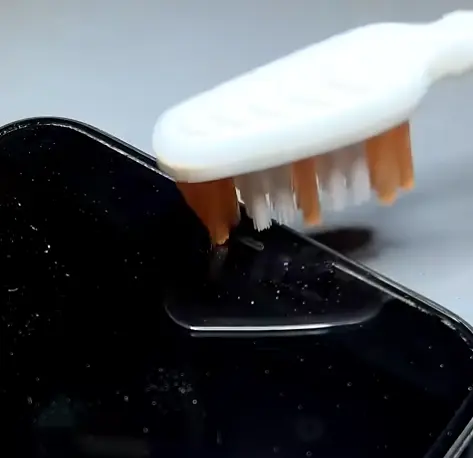
- Brush the speaker grille weekly with a soft, dry toothbrush. Ten seconds once a week prevents the slow dust and salt buildup that gradually degrades sound quality.
- Wipe down your phone after every gym session or outdoor workout. Salt from sweat hardens inside the grille over repeated sessions and is harder to remove once dry.
- Keep your phone away from construction dust. Fine particle dust from construction sites — extremely common in Indian cities — is a leading cause of gradual speaker degradation that most people never connect to their environment. Read our speaker dust cleaning guide if this sounds familiar.
- After any beach visit, wipe the speaker grille area dry with a soft cloth rather than rinsing it. If the phone was in seawater, power it off and have a technician clean it instead of running the tool. Sand and salt are far more damaging than plain water.
Frequently Asked Questions About Water Eject Sound
What is a water eject sound and how does it work?
A water eject sound is a calibrated audio tone, typically around 120 to 250 Hz, that is played through your phone speaker at maximum volume. The vibration created by this frequency physically shakes water droplets loose from the speaker membrane and grille walls and pushes them outward through the speaker opening. It’s a similar principle to the one Apple uses in the Apple Watch’s Water Lock feature.
How long should I run the water eject sound?
One full cycle runs for approximately 30 to 60 seconds. Run it 2 to 3 times in a single session. If you have significant water exposure, wait 30 minutes and run 3 more cycles.
Does the water eject sound work on Xiaomi, Realme, and Samsung phones?
Yes, on all of them. The tool is browser-based so it works on any device that can open a webpage and produce sound — including Xiaomi, Redmi, Realme, Samsung, OnePlus, OPPO, and Vivo.
Can I damage my speaker by playing the water eject sound?
Damage is unlikely. The frequency and volume used are within the normal operating range of smartphone speakers — no different from playing a song at full volume. The tone is just tuned for water ejection rather than music.
What should I do if my phone fell in saltwater?
Do not rinse the phone or add water to it. Saltwater leaves mineral deposits as it dries, which block the speaker differently from plain water. Power the phone off and have a technician clean it rather than running the tool. If muffling continues after several rounds, visit a repair shop — salt corrosion can affect internal contacts.
How do I know if my speaker damage is physical and not just water?
If the speaker produces crackling or buzzing distortion (not just low volume), if one side works but the other is silent, or if the problem existed before any water contact — these symptoms point to physical hardware damage that no sound tool can fix. A repair technician is the right next step.
Get Clear Sound Back Before the Water Dries
Water that sits inside a speaker grille does not improve on its own. As it slowly evaporates, it leaves mineral deposits behind that harden over time and become harder to remove than the original water was. The faster you act, the easier the fix.
Run the free Fix My Speaker water eject sound tool right now — before you search for a repair shop, before you try the rice method, and before you spend a single rupee. Each cycle takes about 30 seconds. Results depend on how much water is trapped, your phone model, and the speaker design.
If you’re dealing with a different type of speaker problem — gradual dust buildup rather than sudden water exposure — head to the Speaker Dust Cleaning Sound guide instead.
Looking for the complete picture beyond just water? See the full Phone Speaker Cleaner guide for water, dust, ear speaker, and iPhone-specific fixes all in one place.

Written by
Waqas ‘Stryker’ Qureshi
Stryker built and maintains the Fix My Speaker tool. He is an SEO strategist and WordPress developer specialising in technical SEO, Core Web Vitals, and AI search optimization (GEO) — helping sites get found on Google and cited inside AI answers. Trained under the iSkills SEBT framework, he brings a 20+ year background in corporate training and quality assurance to the way he tests, documents, and explains things. Read more at strykerworks.com or connect on LinkedIn.
हिंदी में पढ़ें: इस गाइड का हिंदी वर्ज़न यहाँ देखें — Read this guide in Hindi.